
Education IPL Playbook — Educator Capacity

Anyone on campus who needs to submit a job comes through your shop.

Make the shop easier to use than the workaround.

Every in-plant has two jobs. One is production: get the work printed, finished, packed, mailed, or delivered correctly. The other is service delivery: make it easy for the people inside the institution to get work into the shop, understand where it stands, and trust when it will be ready.

This playbook is about the second job.

Faculty, teachers, department admins, research offices, HR teams, registrars, bursars, operations leaders, and building staff all send work into the shop. Some know exactly what they need. Some send incomplete files. Some wait too long. Some use the staff-room copier, a commercial vendor, or a familiar outside shop because it feels easier than submitting through the in-plant.

That is the problem this playbook helps you solve.

Start with one 90-day baseline. Track how jobs enter the shop, where submissions break down, how quickly they move from intake to production, and which submitters still work around the system. Then use the data to improve the workflow and show the institution how much time, follow-up, and friction the shop can remove.

Playbook at a glance

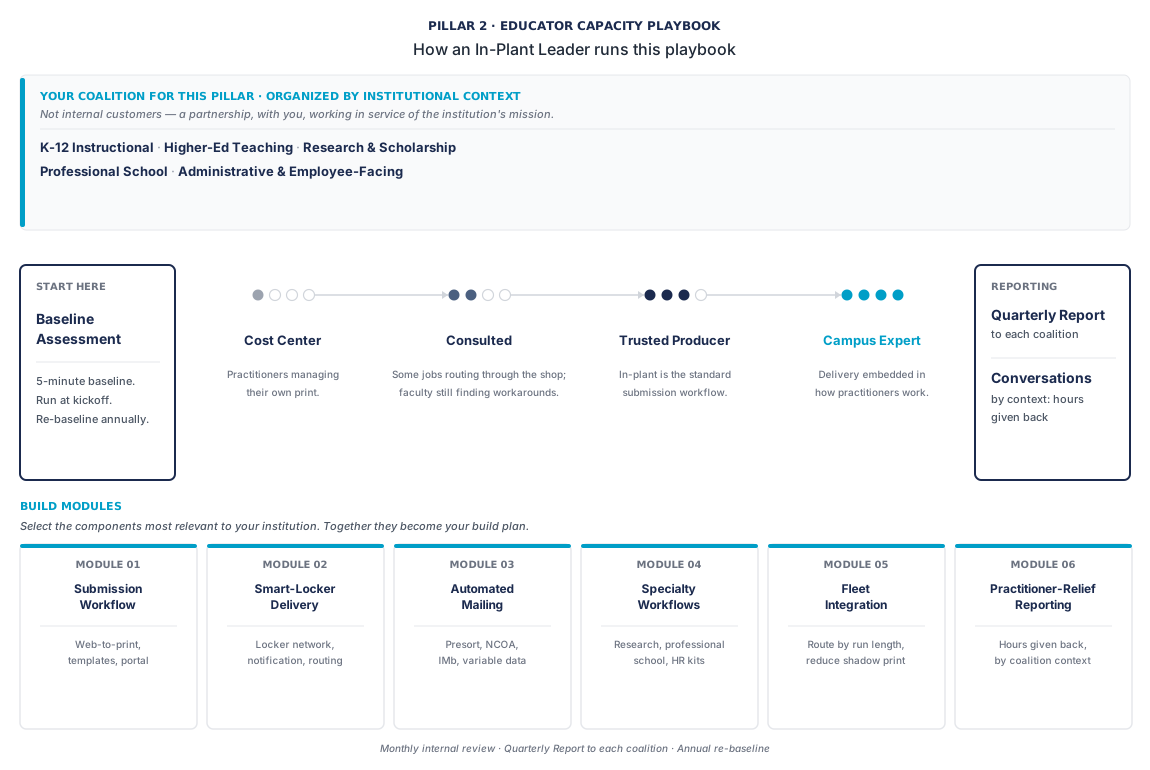
The whole playbook in one view

Coalition partners, maturity arc, build modules, and reporting cadence. The detail follows below; this is the map.

Educator Capacity playbook diagram. Coalition: K-12 instructional, Higher-ed teaching, Research and scholarship, Professional school, Administrative and employee-facing. Maturity arc: Cost Center, Consulted, Trusted Producer, Campus Expert. Six build modules: Submission Workflow, Smart-Locker Delivery, Automated Mailing, Specialty Workflows, Fleet Integration, Practitioner-Relief Reporting. Cadence: Monthly internal review, Quarterly Report to the coalition, Annual re-baseline.

What this playbook helps you prove

Educator Capacity is about the people who submit the work.

In K-12, that may be a teacher, principal, curriculum office, special education team, building admin, or district department. In higher education, it may be faculty, academic departments, research offices, professional schools, HR, internal communications, registrar, bursar, operations, advancement, or student services.

The names change by institution. The service problem is familiar.

People inside the organization need print, mail, signage, packets, forms, readers, posters, reports, booklets, and finished materials. They need the process clear enough that they choose the in-plant before they choose the workaround. This playbook helps answer four practical questions:

  • How easy is it for submitters to get work into the shop correctly?
  • Which submitter groups create the most rework, clarification, or follow-up?
  • Where are people still using copiers, outside vendors, or manual workarounds?
  • What workflow changes would make the shop the trusted default?

The goal is to prove that the in-plant is more than a production destination. It is the service layer that gives time back to educators, administrators, and institutional teams.

Start with the submission path

Most service problems begin before production.

A job arrives without the right file. A due date means something different to the submitter than it means to the shop. A faculty member emails a PDF with no quantity, paper, binding, or delivery details. A building admin sends a recurring packet through a side channel because that worked last year. HR has a mailing calendar, but the shop hears about it late. A research office needs posters, but the poster workflow is not visible in the portal.

None of these are production failures. They are intake failures.

The first task is to map how jobs enter the shop today. Group submissions by source and workflow:

  • Instructional and academic work
  • Research and specialty academic work
  • Administrative and employee-facing work
  • Communications, mail, and recurring departmental work
  • Jobs still happening outside the shop

That map will show where the service system is working and where it depends on memory, relationships, email threads, or emergency effort.

The Educator Capacity scorecard

The metrics most likely to matter in an Educator Capacity conversation.

These are practical enough to baseline in 90 days and specific enough to carry into conversations with academic leaders.

The diagnostic that travels furthest is bad input rate. A portal with a 35% bad input rate is still consuming prepress time that should be production time. If you can only move one number this quarter, start there.

The service delivery rows of the Outcomes Scorecard, plus three that measure submission and delivery specifically. Use these as your quarterly baseline for the practitioner conversation.
Metric What it shows How to use it
Bad input rate How often jobs arrive incomplete, unclear, or not ready for production Track by submitter group. A high rate usually points to a portal field, template, training, or expectation problem. A single submitter type generating a disproportionate share of bad input jobs is an upstream education problem — address it with a template rollout, a portal walkthrough, or a direct conversation.
Submission turnaround Median hours from portal submission to production start Use median, not mean. The gap between these timestamps is your service class triage discipline — it isolates the workflow layer from the production execution layer.
On-time rate by service class Whether the shop meets committed delivery dates, separated by Standard / Rush / Critical / Complex Start with the service classes your shop can actually enforce. Critical-class on-time is the headline number for the practitioner conversation.
Service class adoption rate How often submitters declare a service class at intake A framework nobody uses isn't a framework — it's a wishlist. Track at the portal level. Aim for 90%+ once the framework is in place.
First-time-right rate Whether common jobs can be produced correctly without rework Track by workflow type — course packets, posters, HR kits, mailings, reports. A high reprint rate points to a template gap or an intake form problem.
Status inquiry volume (service delivery addition) How often submitters call or email to ask where a job stands Track the ratio of portal status checks to direct-contact inquiries. A working visibility layer pushes the direct-contact number toward zero.
Locker or delivery cycle time (service delivery addition; only where lockers are deployed) Median hours from locker drop-off to recipient pickup Long cycle times signal notification gaps, wrong locker placement, or a network that needs more nodes. Segment by location to find underperforming nodes.
Automated mailing volume (service delivery addition; where mailing is integrated) Pieces processed through automated mailing vs. the pre-automation baseline Translates directly into postage savings ($0.05–$0.14 per piece) and labor hours absorbed. Pair the volume number with the postage savings calculation for the practitioner and finance conversation.
Peak performance commitment On-time and first-time-right rates during the institution's highest-volume periods, plus the written plan that produced them Compare peak-week metrics to baseline. Document the plan in July. Carry it forward year over year.

If you only track three numbers this quarter, start with bad input rate, submission turnaround, and status inquiry volume. Together they show whether the shop is easy to use, whether the intake path is working, and whether submitters trust the visibility they have.

What each coalition cares about

Five coalitions. Five different versions of the same question.

Each coalition measures service differently — not in turnaround minutes, but in whether the work came back correctly, without having to chase it. The guides below translate the shop's numbers into each group's practical concern.

Four of the five coalitions are organized by institutional context. The professional school coalition appears only when the institution has a medical, law, or graduate professional school — flag and skip if not applicable.

Filter by coalition

K-12 instructional

K-12 instructional coalition (Curriculum Director, Principal / Building Admin, Special Ed Coordinator)

For K-12 instructional teams, the question is whether teachers and building staff can stop owning print logistics themselves. If teachers still run packets on staff-room copiers, the shop may have capacity, but the workflow has not become easier than the workaround. If resource teachers assemble accommodation or intervention materials by hand, the problem may be trust, timing, format, or intake clarity.

The question they are actually asking: Are my teachers spending their time teaching, or are they spending it on print logistics? When my resource teacher needs a modified packet by Thursday morning, does she submit it through the shop and forget it — or does she produce it herself after hours because the shop is too slow or too unclear?

Common objections: "Teachers are still hitting the staff-room copier because it feels faster." / "We tried a portal a couple of years ago and nobody used it." / "The building admins are buried in print logistics that should never have landed on their desks."

Proof points:

  • Bad input rate trend over the last four quarters, segmented by building
  • Submission turnaround median for the Critical class — modified packets, intervention sets, accommodation runs
  • Status inquiry volume: percentage of submitters who track status without calling the shop
  • A documented submission workflow with templates for recurring K-12 work types — course packets, intervention sets, accommodation runs, parent communications, building newsletters
  • A standing offer to consolidate building-level copier print volume into in-plant production, with a 90-day pilot scope (one building or one grade band)

What to bring: The K-12-tagged service delivery scorecard. A list of recurring submitter types your shop has documented templates for. A specific recent example of a teacher submission that landed cleanly, with intake-to-delivery time.

Higher-ed teaching

Higher-ed teaching coalition (Faculty Affairs / Department Chair / Dean of Instruction)

For faculty and academic departments, the question is whether the shop can support teaching work without adding another administrative burden. Faculty need course packets, syllabi, exam booklets, lab materials, readers, and departmental materials on timelines tied to the academic calendar. They usually do not need a long explanation of the shop. They need a simple path, clear lead times, and confidence that the job will be ready.

The question they are actually asking: When my teaching faculty submit course packets, syllabi, exam booklets, or routine departmental print, does it come back on the timeline they need — without my faculty having to navigate three vendors or call the shop directly?

Common objections: "Faculty stopped using the in-plant because the turnaround was a week and the portal was confusing." / "Some of my faculty have built relationships with a commercial vendor and don't want to switch back." / "Last semester finals week was a fire drill on the in-plant side; faculty don't trust the timing."

Proof points:

  • On-time rate by service class for the last four quarters, with the exam window slice broken out
  • Submission turnaround median; status inquiry volume
  • A documented submission workflow with faculty-facing templates — syllabus, exam booklet, course packet, lab manual
  • A specific recent example of a high-volume faculty submission that landed cleanly — a 200-student lab manual, a course packet run, an exam window booklet batch
  • The peak-readiness plan for the upcoming exam window, with capacity reservation language her faculty can quote

What to bring: The higher-ed-teaching-tagged scorecard. The faculty-facing submission portal screenshot or guide. A cost comparison: in-plant unit cost vs. the commercial vendor unit cost her faculty have been using.

Research & scholarship

Research and scholarship coalition (VP for Research / Sponsored Programs Director / Graduate Studies Dean)

For research teams, the question is whether the shop can handle specialty work with the quality and timing discipline it requires. Conference posters, pre-prints, dissertations, grant proposal materials, technical reports, and presentation pieces often have short timelines and high visibility. A missed deadline or incorrect format sends faculty back to outside vendors quickly.

The question they are actually asking: When my research faculty submit conference posters, journal pre-prints, grant proposal collateral, dissertation production, or technical reports, does the in-plant carry the specialty workflow these jobs require — short-run, high-stakes, time-bound to a conference or submission deadline, visually demanding?

Common objections: "Our research faculty are sending posters to FedEx because they don't trust the in-plant for large format." / "Dissertation production goes to a third-party every cycle — we've never built it in-house." / "Nobody at the in-plant has ever talked to my office about the research production pipeline."

Proof points:

  • Research-tagged submission turnaround median, segmented by job type — poster, pre-print, grant proposal, dissertation
  • Specific recent examples: posters produced for a faculty conference run, a dissertation production batch, a grant proposal binding — with quality and timeline notes
  • Equipment capability list relevant to research production: wide format, perfect bind, saddle stitch, color accuracy on demanding charts and figures, archival paper specs
  • A standing offer to be in the grant proposal production conversation early (24–48 hours before submission, not the morning of), with a documented Tier 1 research workflow

What to bring: The research-tagged scorecard. The research production capability sheet — large format, finishing, color, paper stocks. The list of conference cycles and grant submission windows you are already planning around.

Professional school

Professional school coalition (conditional — Medical, Law, or other Graduate Professional School Dean's Office or Director of Operations)

For professional schools, the question is whether the in-plant understands their calendar and production profile. Law, medicine, and other graduate professional schools often run on cycles that don't match the general campus calendar. Case readers, residency materials, board-prep packets, journal volumes, clinical materials, and program-specific publications may need dedicated workflows.

The question they are actually asking: Does the in-plant understand the production profiles of professional school work — case readers and brief booklets in law, residency and board-prep and clinical materials in medicine — and can it absorb that volume on the school's calendar rather than the institution's general calendar?

Common objections: "Our case readers go to an outside copy shop because the in-plant turnaround conflicts with our class schedule." / "Medical residency materials are time-sensitive in a way the general in-plant doesn't track." / "Our journal production has been outsourced for years because nobody in the in-plant knew the binding spec we needed."

Proof points:

  • Professional school-tagged submission turnaround median by school
  • Specific recent examples: a case reader batch for a law section, a residency handbook run, a journal volume binding — with quality and timeline notes
  • Capability list relevant to professional school production: perfect bind, saddle stitch, tabbed divider, hardback or softcover with custom covers, specialty stock
  • A standing offer to join the professional school's academic calendar planning process so the in-plant's capacity is reserved against the school's specific cycle

What to bring: The professional school-tagged scorecard. The capability sheet specific to that school's recurring work. A list of recent successful jobs at that school's required quality bar. (Omit this coalition if the institution does not have professional schools.)

Administrative & employee-facing

Administrative and employee-facing coalition (HR / People Operations, Operations Director, Internal Communications, Bursar / Registrar / Finance)

For administrative teams, the question is whether recurring institutional work can move through the shop with less coordination and more control. These teams need open-enrollment kits, tax forms, transcript mailings, onboarding packets, internal newsletters, signage, board books, reports, or recurring mailings. Much of the work is time-bound, data-sensitive, and easy to outsource when no one has shown a cleaner internal path.

The question they are actually asking: When my office submits routine high-volume work — open-enrollment kits, tax forms, transcript runs, employee onboarding packets, internal newsletters, signage, board books — does the in-plant carry it efficiently, reliably, and at a cost that beats what we'd pay outside?

Common objections: "Open enrollment goes to a third-party every year because nobody knew we could do it in-house." / "The Bursar's tax-form mailing has run with the same outside vendor for fifteen years." / "Nobody at HR knows what variable data printing is or whether the in-plant can do it."

Proof points:

  • Administrative-tagged submission turnaround median by submitter type
  • Specific recent examples: an HR open enrollment kit run, a Bursar tax-form mailing with documented postage savings, an Operations signage batch
  • Capability list: variable data composition, presort and NCOA mailing, IMb compliance, FERPA/HIPAA-compliant data handling, web-to-print template library for routine departmental orders
  • A standing offer to audit the institution's currently outsourced administrative print to identify the work that should be in-plant on cost and compliance grounds
  • A specific dollar number: postage savings achieved on the most recent mail processing cycle, or cost per piece comparison on a routine outsourced job vs. in-plant equivalent

What to bring: The administrative-tagged scorecard. The variable data and mailing capability sheet. The postage savings number from the most recent automated mailing cycle.

Where your shop stands today

A maturity model for practitioner support.

Use this maturity model to place your current practitioner support honestly. The continuum is the same across K-12 and higher ed; what changes is which submitter types dominate at each level. In K-12, Level 1 reads as the teacher self-printing modified packets in the staff room. In higher ed, Level 1 reads as the faculty member running her own copies on the departmental copier or routing to FedEx for anything more demanding than a syllabus.

Level 1
Cost Center
The shop has capacity. Submitters haven't found it yet.
Read the full description
Teachers use staff-room copiers. Faculty self-print small jobs and send specialty work outside. Research faculty route posters to an outside large-format shop. HR has a vendor relationship that started fifteen years ago. The institution is paying for the work three times: in the shadow print volume on building copiers, in the outside vendor invoices, and in the time practitioners spend producing materials themselves. The in-plant has the capability for most of this work; the shop just isn't visible as the easy option.
Level 2
Consulted
Work arrives — but not on a path the shop controls.
Read the full description
The in-plant receives high-volume or finished work, but many requests still arrive by email, walk-in, forwarded files, or direct relationships with individual staff members. Turnaround is unpredictable because intake doesn't capture the right specs the first time. Bad input rate is high. Submitters have no way to know where a job stands without calling.
Level 3
Trusted Producer
The submission workflow is the default. Production runs on it.
Read the full description
A web-to-print portal (webCRD, OnPrintShop, PageDNA, Canon UniFlow Online, or equivalent) is the institution's default submission path. Templates by submitter type make routine work straightforward. Service classification (Standard / Rush / Critical / Complex) is published and enforced at intake. Status infrastructure eliminates most "where is it?" inquiries. Bad input rate is below 10%. Shadow print volume on building copiers starts to drop. (Where SumnerOne's reference shops sit today.)
Level 4
Campus Expert
The shop is embedded in the institution's workflow. Submitters don't think about it.
Read the full description
The friction the practitioner used to absorb is removed from the workflow entirely. Materials route to smart lockers placed in classroom-adjacent or building-adjacent locations, with automated notification. Where mailing is part of the work — HR open enrollment, Bursar tax forms, alumni transitions, family communications at scale — the operation runs end-to-end with presort, NCOA, IMb compliance, variable data composition, and FERPA/HIPAA-compliant data handling. The fleet integrates with classroom and departmental devices so the in-plant absorbs routine workflow without the practitioner thinking about it. The shop is no longer a destination to navigate; it is infrastructure that runs underneath the work.
The maturity question is whose time the system is spending. Levels 1 and 2 spend the practitioner's. Levels 3 and 4 hold the work where it belongs. The leap that produces practitioner trust is Level 2 → Level 3: a web-to-print portal with templates and service classification. The leap that produces a different conversation at budget time is Level 3 → Level 4: smart-locker and automated mailing infrastructure that makes the in-plant invisible.

The six tracks of an Educator Capacity build-out

Sequenced in the order most shops can execute.

Some require software or capital. Several are workflow disciplines that can begin with the tools already in place.

01
Submission workflow
Make the portal the default path for every submitter type on campus.
Read the full description

Start with the recurring jobs that generate the most follow-up and build intake templates for them. A template should capture everything the shop needs to run the job — file, quantity, due date, delivery method, service class, finishing, billing code — so your team isn't chasing it later. Set service classification (Standard / Rush / Critical / Complex) as a required intake field and publish what each class means: required lead time, what must be included at submission, and what happens when a job arrives outside the window. Start with one submitter group, build as adoption grows.

Measure: bad input rate, service class adoption rate, submission turnaround median, on-time rate by service class.

02
Smart-locker delivery
Bring delivery to where the practitioner is, not where the shop is.
Read the full description

Audit campus geography for high-traffic practitioner zones — faculty offices, building lobbies, library entrances, residence-hall mail centers — and deploy a locker network with notification and access-control integration. The key is workflow integration: a "ready" status in the shop triggers locker placement and automatic recipient notification, so delivery happens without the submitter having to initiate it. Build chain of custody records for any locker drop containing controlled-handling material — accommodation runs, secure exam booklets, materials with personal data.

Measure: locker checkout cycle time by node, network-wide cycle median, fraction of delivered volume routed through lockers vs. counter pickup.

03
Automated mailing
Build the mailing operation as a strategic capability, not a back-office function.
Read the full description

For higher-ed institutions, automated mailing is often the highest-payoff investment on the path from Trusted Producer to Campus Expert. A complete mailing operation covers presort processing (postage savings of $0.05–$0.14 per piece), CASS-certified address verification, NCOA processing on every cycle, Intelligent Mail Barcode compliance, and variable data composition integrated with institutional CRM and HR data sources under FERPA/HIPAA-compliant handling. The recurring jobs that matter most: HR open enrollment, Bursar tax forms, alumni transitions, family communications, financial aid notifications.

Measure: automated mailing volume vs. baseline, postage savings per period, FERPA/HIPAA incident count (target: zero), undeliverable rate post-NCOA.

04
Specialty workflows
Carry the production profiles the institution's submitter mix actually demands.
Read the full description

Audit the submitter coalition and build the specialty workflows the audit reveals. For research teams: wide-format poster production, perfect-bind dissertation workflows, grant proposal binding. For professional schools: case readers, residency handbooks, journal volumes. For employee-facing work: HR open enrollment kits with variable data composition, tax form mailings with secure handling, transcript and credential runs with FERPA-compliant chain of custody. Document each workflow as a template in the submission portal so the submitter doesn't have to know the specs — the production knowledge lives in the shop, not in the relationship.

Measure: specialty job turnaround median by workflow type, first-time-right rate by specialty, share of volume that is specialty-tagged.

05
Fleet integration
Make the in-plant vs. departmental copier decision automatic, not the submitter's problem.
Read the full description

The shadow-print problem at the practitioner level is a service design problem, not a governance one — the IT governance lens lives in Playbook 4. The question the submitter shouldn't have to answer alone: when should a job go to the in-plant versus run on the building copier? Build the answer into the workflow. Set thresholds by run length, finishing, paper, color, sensitivity, and deadline, then route jobs to the appropriate device through the portal or intake process. The goal is a workflow that steers work to the right place before the submitter has to think about it.

Measure: shadow print volume on departmental devices before and after integration, share of appropriate work routed through the in-plant.

06
Practitioner-relief reporting
Translate service metrics into time returned — that is the metric the coalition wants.
Read the full description

The Outcomes Scorecard's Curriculum & Faculty Talk Track tab is the translation tool. Convert raw service delivery numbers into plain language: a reduction in follow-up email volume becomes fewer back-and-forth threads per faculty member per week; a web-to-print portal that absorbed 200 routine submissions becomes hours of admin time across participating departments. Send each coalition the version that matches their work — teacher time for K-12, academic calendar confidence for higher-ed faculty, deadline protection for research, postage savings and compliance for administrative teams. Use estimates carefully: show the method, not just the number.

Measure: per-coalition reporting cadence, hours-given-back calculation, retention dimension where measurable.

The 90-day Educator Capacity baseline

Do not begin with every submitter type.

Choose one coalition, one workflow, and one baseline period.

Good starting points: K-12 intervention or accommodation materials / higher-ed course packets or exam booklets / research posters / HR open enrollment materials / registrar or bursar recurring mailings / internal communications newsletters.

For 90 days, track:

  1. How the job was submitted
  2. Whether the input was complete
  3. Time from submission to production start
  4. Time from production completion to pickup, delivery, or mailing
  5. Whether the job required rework
  6. How often the submitter contacted the shop for status

At the end of the baseline, write a one-page summary. Use this structure:

  • What workflow we tracked
  • What volume came through
  • What slowed the work down
  • What the shop improved
  • What needs to change next
  • What this means for the submitter group

That one page is the bridge from shop data to institutional support. Bring it to the relevant coalition in plain language. If bad input rate was 31 percent, say what that cost. If submission turnaround dropped after a new template rollout, show the before and after. The point is not to make the shop look perfect. The point is to make the work visible enough to improve and valuable enough to defend.

How to use this in coalition conversations

The best coalition conversations are specific.

Do not start with the full shop. Start with the workflow that group recognizes.

For K-12 leaders, talk about teacher time and building-level readiness. For faculty leaders, talk about academic calendar confidence. For research offices, talk about specialty work and deadline protection. For professional schools, talk about calendar fit and repeatable production standards. For administrative teams, talk about recurring work, mailings, data handling, and fewer vendor handoffs.

Bring three things: a small scorecard, a concrete example from the last quarter, and a clear next step.

The next step should be operational — a template rollout, a service class pilot, a portal walkthrough, a locker pilot, a recurring mailing review, a departmental copier routing threshold, a 90-day workflow baseline. Keep the conversation close to the work. That is where the in-plant earns trust.

Related playbooks

Where this playbook ends, three others begin.

Back-bridge to the stakeholder page

Need to bring faculty, curriculum, HR, or administrative leaders into the conversation?

Closing

Start with one submitter group and one workflow.

You do not need to solve the shadow-print problem across the whole institution in one quarter. Pick the coalition that is already paying the highest price in logistics overhead, track one workflow for 90 days, and bring the result to the one person who most needs to hear it.

Then decide what the next 90 days should prove.

That is how the shop moves from being the available option to being the easy choice.

Start the conversation

Make the shop easier to use than the workaround.

Bring SumnerOne into the conversation about submission workflow, service class discipline, smart-locker delivery, automated mailing, or any of the six tracks above. We will help you choose the right starting coalition, baseline the work for 90 days, and translate the result into the language your institution can use.

One coalition. One workflow. Ninety days. That is enough to begin.